Configuration Guide
Configuration Methods
You can configure registries in two ways: Setup Wizard: On first run, the UI shows a setup wizard to configure your registry through the web interface Config File: Pre-create aregistries.config.json file for automated deployments
Environment Variables
Variable Description Default
CONFIG_FILE
Path to registries configuration file (optional - setup wizard used if not provided). By default the app checks /app/registries.config.json. When running inside the official container it is common to set this to /app/data/registries.config.json (for example by mounting ./data:/app/data).
/app/registries.config.json
DATA_DIR
Directory where vulnerability scan results and scan job state are persisted. Mount this directory to keep scan history across container restarts.
/app/data
TRIVY_CACHE_DIR
Directory where the built-in Trivy scanner stores its vulnerability database. Only used when scannerUrl is builtin. Mount this directory to avoid re-downloading the database on every restart.
/root/.cache/trivy
READ_ONLY
Enable read-only mode (disable delete operations)
false
LOG_LEVEL
Logging verbosity (DEBUG, INFO, WARNING, ERROR)
WARNING
UVICORN_WORKERS
Number of Uvicorn worker processes inside the container
4
SCAN_WORKERS
Maximum number of concurrent background scan workers within the UI process
2
SCAN_RETRIES
Number of times to retry a scan that fails due to transient registry contention
3
SCAN_RETRY_DELAY
Base delay in seconds between scan retries (multiplied by the attempt number)
2
PORT
Port for the web interface (used by run.py; ignored when running Uvicorn directly)
5000
Setup Wizard (First Run)
If no configuration file exists, the UI displays a setup wizard on first access: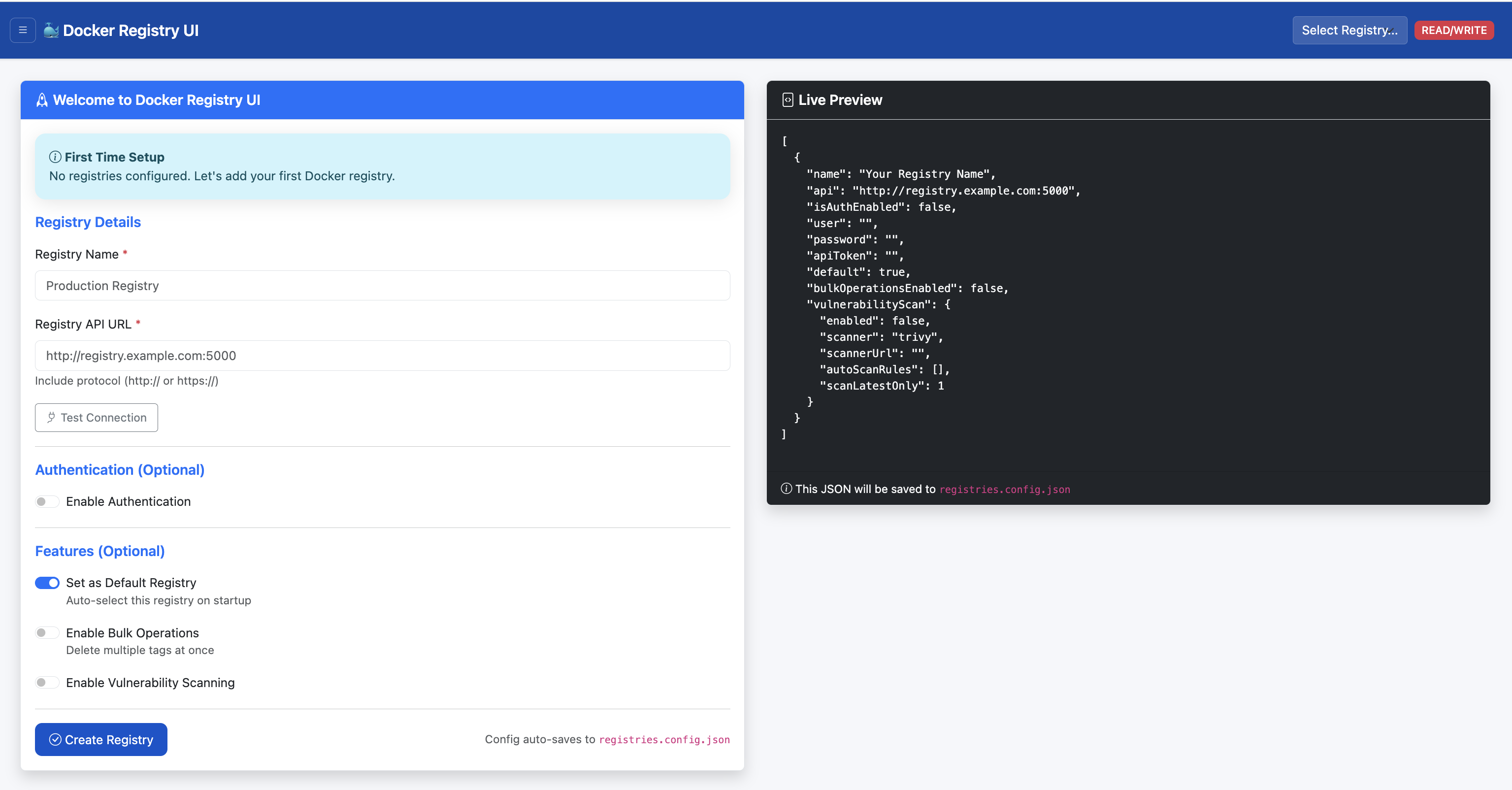
Access the UI at http://localhost:5000
Enter registry details:
http://localhost:5001)
Authentication: Enable if registry requires credentials
Click "Test Connection" to verify
Save configuration
Configuration is saved to the directory containing the configured CONFIG_FILE. Scan results are persisted under DATA_DIR (default /app/data).
Manual Configuration File
For automated deployments, create aregistries.config.json file before starting the UI:
Minimal example
mkdir -p data
cat > ./data/registries.config.json <<'EOF'
{
  "registries": [
    {
      "name": "Local Registry",
      "api": "http://registry:5000"
    }
  ]
}
EOF
With built-in Trivy scanner
{
  "registries": [
    {
      "name": "Local Registry",
      "api": "http://registry:5000",
      "vulnerabilityScan": {
        "enabled": true,
        "scanner": "trivy",
        "scannerUrl": "builtin"
      }
    }
  ]
}
With remote Trivy server
{
  "registries": [
    {
      "name": "Local Registry",
      "api": "http://registry:5000",
      "vulnerabilityScan": {
        "enabled": true,
        "scanner": "trivy",
        "scannerUrl": "http://trivy-server:8080"
      }
    }
  ]
}
docker run -d --name registry-ui -p 5000:5000 \
  -v $(pwd)/data:/app/data \
  vibhuvioio/docker-registry-ui:latest
Registry Configuration Options
Field Description Required
name
Display name for the registry
Yes
api
Registry v2 API endpoint (e.g., http://registry:5000)
Yes
default
Whether this is the default selected registry
No
auth
Authentication object for basic auth (see below)
No
vulnerabilityScan
Vulnerability scanning configuration (see below)
No
bulkOperationsEnabled
Enable bulk delete operations for this registry
No
Authentication
Basic authentication is supported by adding anauth object:
{
  "name": "Secure Registry",
  "api": "http://nginx-proxy:5004",
  "auth": {
    "type": "basic",
    "username": "admin",
    "password": "secret"
  }
}
Vulnerability Scanning Configuration
ThevulnerabilityScan object controls per-registry scanning behavior:
{
  "vulnerabilityScan": {
    "enabled": true,
    "scanner": "trivy",
    "scannerUrl": "builtin",
    "scanLatestOnly": 1,
    "autoScanRules": [
      { "pattern": ".*" }
    ]
  }
}
enabled: Turn scanning on or off for this registry
scanner: Scanner type — currently only trivy is supported
scannerUrl: builtin for local Trivy, or a remote Trivy server URL such as http://trivy-server:8080
scanLatestOnly: Number of latest tags to scan when using auto-scan / scan-all
autoScanRules: List of repository name patterns; only matching repositories are scanned by scan-all
Local vs remote Trivy
Built-in (scannerUrl: "builtin")
Uses the Trivy binary inside the UI container
Requires mounting /root/.cache/trivy (or TRIVY_CACHE_DIR) to persist the vulnerability DB
Scans are serialized with a file lock to protect Trivy's filesystem cache
Best for simple, low-volume deployments
aquasec/trivy:latest server)
Scans can run concurrently across UI workers
The Trivy server manages its own DB and cache
Recommended for production and multi-worker deployments